Tuesday, 10 March 2015

Cool tip of the Day: Dark Theme, Top Eclipse Luna Feature

Configure the Dark option!
In a previous post I talked about setting up a more relaxing theme for Eclipse.
Well the LUNA release of Eclipse has gone one better and it now comes as standard.

To use the dark theme, go to Preferences -> General -> Appearance and choose ‘Dark’.

The theme extends to more than just the Widgets. Syntax highlighting has also been improved to take advantage of the new look. However I still like the themes from Eclipse Color Themes plugin as it allows a little more flexibility.

This is a great new additional feature.

Friday, 20 February 2015

Spring Boot Rocks!

 Spring Boot ...
In case you have missed this wonder ...
Spring Boot makes it easy to create stand-alone, production-grade Spring based Applications that you can "just run". We take an opinionated view of the Spring platform and third-party libraries so you can get started with minimum fuss. Most Spring Boot applications need very little Spring configuration.
It is really a great tool and I can't recommend it  enough.
When coding a micro-service or a single context application I can't think of an easier way of hosting your spring context.

Developers need tools and technology that allow them to get started quickly with the least amount of friction. They also demand modular, lightweight and opinionated technology to optimize productivity. Spring Boot takes aim at the very issue of getting up and running quickly while dramatically improving development velocity.

To get started with Spring Boot, you can add to a POM file the following settings:

<parent>
    <groupId>org.springframework.boot</groupId>
    <artifactId>spring-boot-starter-parent</artifactId>
    <version>1.2.1.RELEASE</version>
</parent>
<dependencies>
    <dependency>
        <groupId>org.springframework.boot</groupId>
        <artifactId>spring-boot-starter-web</artifactId>
    </dependency>
</dependencies>

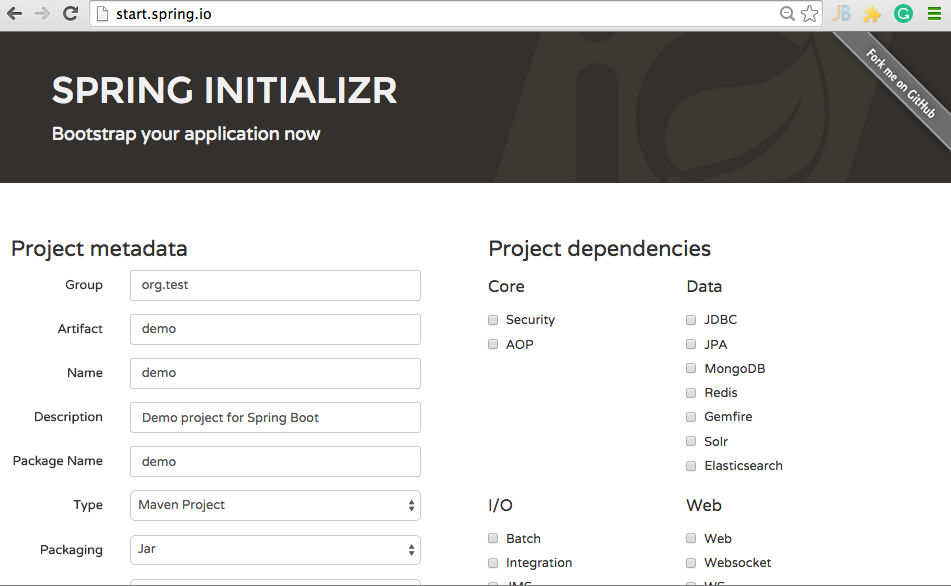
Or point your browser at Spring Initializer -http://start.spring.io. Spring Initializer provides a web based interface allowing developers to select an application/workload and relevant dependencies. It will then generate a starter application with build support (supports Maven POM, Maven project, Gradle Config, Gradle project).

Screenshot of Spring Initializer:


Thursday, 22 January 2015

What's a data View? The Model View ViewModel


In an earlier post on a MVC variant called VESPA I discussed separating out the the model and the controller into Store and Entities, Actions and Presenter respectively.

In a discussion on this approach the MVVM pattern was discussed and for me it helped with a problem I had with VESPA.

But first a recap of MVC before talking about MVVM.

The basics of MVC

The usual MVC definition (of which VESPA is a sub-definition) divides the application into three kinds of components, the model–view–controller design defines the interactions between them.
  • A controller can send commands to the model to update the model's state (e.g., editing a document). It can also send commands to its associated view to change the view's presentation of the model (e.g., by scrolling through a document). 
  • A model notifies its associated views and controllers when there has been a change in its state. This notification allows the views to produce updated output, and the controllers to change the available set of commands. In some cases an MVC implementation might instead be "passive," so that other components must poll the model for updates rather than being notified. 
  • A view requests information from the model that it uses to generate an output representation to the user. 

It is the View in VESPA that I have been having an intellectual problem with, which is where I think MVVM helps.

The basics of MVVM

Broadly speaking, the model-view-viewmodel pattern attempts to gain both the advantages of separation of functional development provided by MVC as well as providing the advantage of abstracting data into the form that is recognisable to the end user.

The components of MVVM are as follows:


  • Model exactly as MVC 
  • View exactly as MVC, the code that actually constructs the display, and contains the commands that create the application. 
  • View Model this is the binding between View and Model when the Model does not reflect the data that the users wish to see. 

A criticism of the pattern comes from MVVM creator John Gossman himself, who points out that the overhead in implementing MVVM is "overkill" for simple UI operations. He also states that for larger applications, generalizing the ViewModel becomes more difficult. Moreover, he illustrates that data binding in very large applications can result in considerable memory consumption.

I would agree and this has lead me to discount MVVM until this point.

This is because there is often a 1-1 mapping between data on the View and data in the Model. This is certainly true of CRUD type screens.

The problem starts when users demand changes or the developers alter the model.

At this point the introduction of a view-model is needed.

My adaptation of MVVM to VESPA is to add a further subdivision to the View sooner than the Model.

I believe that the model-views are part of the View as they share the dynamism of the view code and should not be bundled into any projects or build components that belong to the model.

A good view-model object should appear to the View developer as just an other entity object.
How to define your Model-Views

If the Store objects bind and map to the physical data storage; and the Entities map to the logical structure that is the normalised data the application needs to hold.

The model-view maps to the concept and is an abstracts implementation details to focus on the entities and their relationships and properties that are elicited in the problem domain. It’s the ONLY part of the design best suited for communication with stakeholders in general.

So how to do the model-views ... just ask the stake holders what they want to see.

Then sit back and work out how to plug the entities into them.

The best part is you can mock the data in the model-view so the UX guys can work their magic but that is a different post.





Friday, 11 April 2014

Cool tip of the day: Random dummy images

The above is a random image, just refresh to see it change. 
Some times you need images in your project as you would with Lorum Ipsum but this is for images.

http://lorempixel.com/

Love it!

Cool tip of the Day: Flat UI

Another nice CSS framework to do create a flat look to your web site.

Not used it yet but it looks nice can't comment on the CSS.

http://designmodo.github.io/Flat-UI/

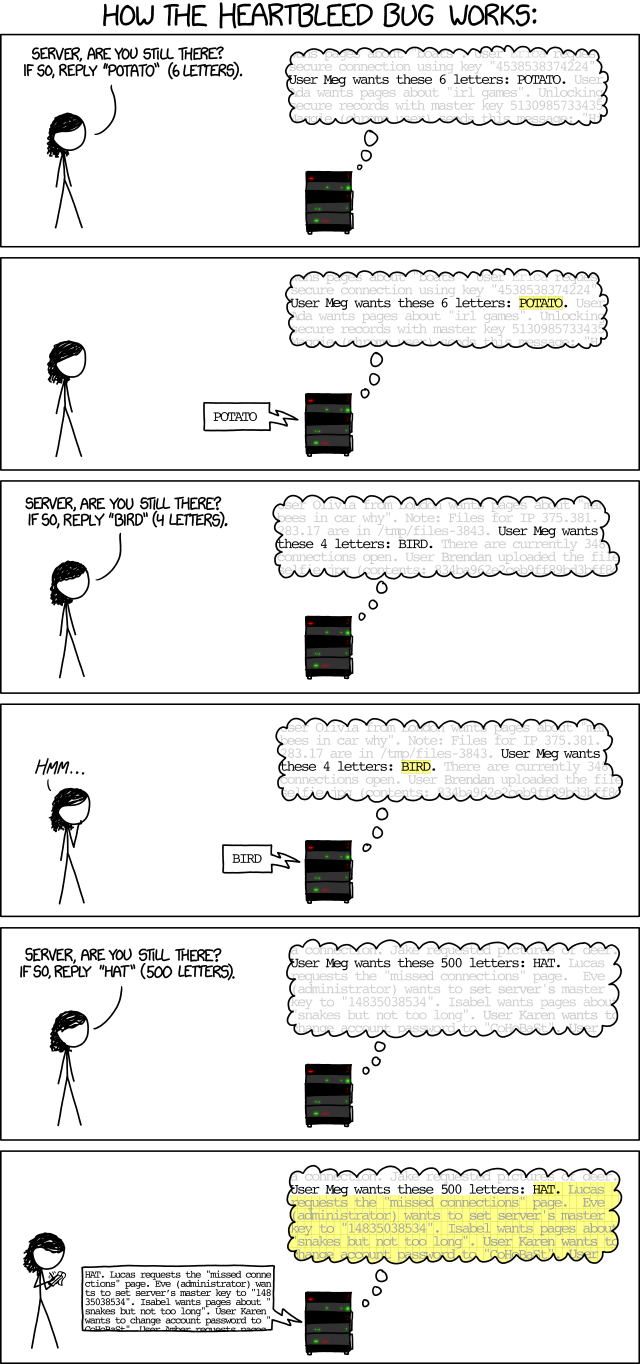
Cool tip of the day: Heartbleed exploit

As you may have heard there is a serious problem with SSL.
But what to do about it?
The majors seem to be running around fixing things but what do us minows do?

I would suggest running this check first ... Heartbleed server test (http://filippo.io/Heartbleed/).

If you are not sure what this all means I found this link helpful

And in closing:

Wednesday, 9 April 2014

Cool tip of the Day Granule

The load time of your web page is often down to the number JS and CSS files that your page includes.
There is a tension between developers and sysadmins, developers want to keep everything simple and in separate editable files while the sysadmins want a nice simple & fast load time.
If you see some of the suggestions on optimising your site (see: http://developer.yahoo.com/performance/rules.html) the suggestion is to keep things together.

80% of the end-user response time is spent on the front-end. Most of this time is tied up in downloading all the components in the page: images, stylesheets, scripts, Flash, etc. Reducing the number of components in turn reduces the number of HTTP requests required to render the page. This is the key to faster pages.
One way to reduce the number of components in the page is to simplify the page's design. But is there a way to build pages with richer content while also achieving fast response times? Here are some techniques for reducing the number of HTTP requests, while still supporting rich page designs.
Combined files are a way to reduce the number of HTTP requests by combining all scripts into a single script, and similarly combining all CSS into a single stylesheet. Combining files is more challenging when the scripts and stylesheets vary from page to page, but making this part of your release process improves response times.
SO how to solve this ... for JSP/JAVA devs use Granule (https://code.google.com/p/granule/).
To quote there site...
Granule is an optimization solution for Java-based web applications (JSP, JSF, Grails). It combines and compresses JavaScript and CSS files into less granulated packages, increasing speed and saving bandwidth.
The granule solution includes:
  • JSP Tag library. You just need put the tag around your StyleSheets and JavaScripts to compress and combine them.
  • Ant task, to include pre-compressing in your build scripts.
HAY-PRESTO! Every one is happy.